


Buffer Review: Who Writes the Post?

TL;DR
Is Buffer good for LinkedIn? As a scheduler, yes. It's easy to use, free for 3 channels, and its Insights page is very well made. But if you want help writing the post itself, it won't do much. Its AI reworks text you already wrote. When I asked it to write a full post from my idea, it asked me to share the idea, which was already in the post.
Now the long version.
Signing up
Pretty smooth. Email, password, done. The free plan didn't ask for a card.
Then a few questions: how I'd describe myself, how many accounts I manage, which networks I care about. One question caught my eye. It asked which tools I use today, and the options included ChatGPT and Claude, and Typefully and Hypefury. So Buffer knows a lot of people write their posts somewhere else and come to Buffer to schedule them. That told me a lot before I'd even started.
Then I connected LinkedIn. LinkedIn showed me the list of what Buffer wanted: 14 permissions. Reading my posts and their stats, my profile analytics, my connections' data for mentions, posting and deleting for me and my page. It can post to both my profile and the Wiral Social page. That's very advanced access.
Right after that, a pop-up said my Buffer activity would show up as a "capability" on my LinkedIn profile.
Posting goal and best times
Next it asked how often I wanted to post: once, three times or five times a week. I picked three, and it suggested times: Wednesday 5 to 6 PM, Thursday 3 to 4 PM and Friday 2 to 3 PM.
I liked that. One thing to keep in mind: those times were for the Wiral Social page, which barely has any history yet, so they're probably general averages. Buffer itself says reach depends on more than timing. I learned the same in my 4-month posting experiment: showing up regularly mattered more than the exact hour. If you want a rough starting point anyway, our free best time to post tool gives you one.
The dashboard
The home page is where I slowed down. Week streak, posting goals, comment score, first steps, unanswered comments, templates, and four posts from Buffer's blog. That's a lot happening on one screen, and frankly, it was a bit confusing.
The streak said 3 weeks. I hadn't posted anything through Buffer. It counted posts I'd published elsewhere. A bit misleading.
But I liked one thing a lot: it pulled in 11 unanswered comments from my LinkedIn posts, right there on the home page.
I think a dashboard should be minimal and focus on getting the post published. The streaks and scores could sit further down.
My idea, and the AI Assistant
Buffer has a New button with two choices: Post or Idea. Interesting concept. Ideas live on a board until you're ready to write them.
I gave it an idea I've been thinking about: "A lot of people in the community space are not aware of the difference between audience and a community. Those two words carry different meaning."
I asked the AI Assistant to expand it. It gave back three sentences that said the same thing in other words. I pressed Insert, expecting it to replace my text. It just added the block under my idea. I found that a bit weird.
So I clicked Create Post. It opened the composer with my text copied across, and that's it. Nothing else happened.
Fine. I opened the AI Assistant again, picked Write More and gave it clear instructions: "Expand this idea into a fully written post with a nice flow from start to end. Keep it engaging and informative."
It replied: "Please share the idea you'd like me to expand, and I'll turn it into an engaging, polished social media post."
My idea was right there in the post. It couldn't see it.
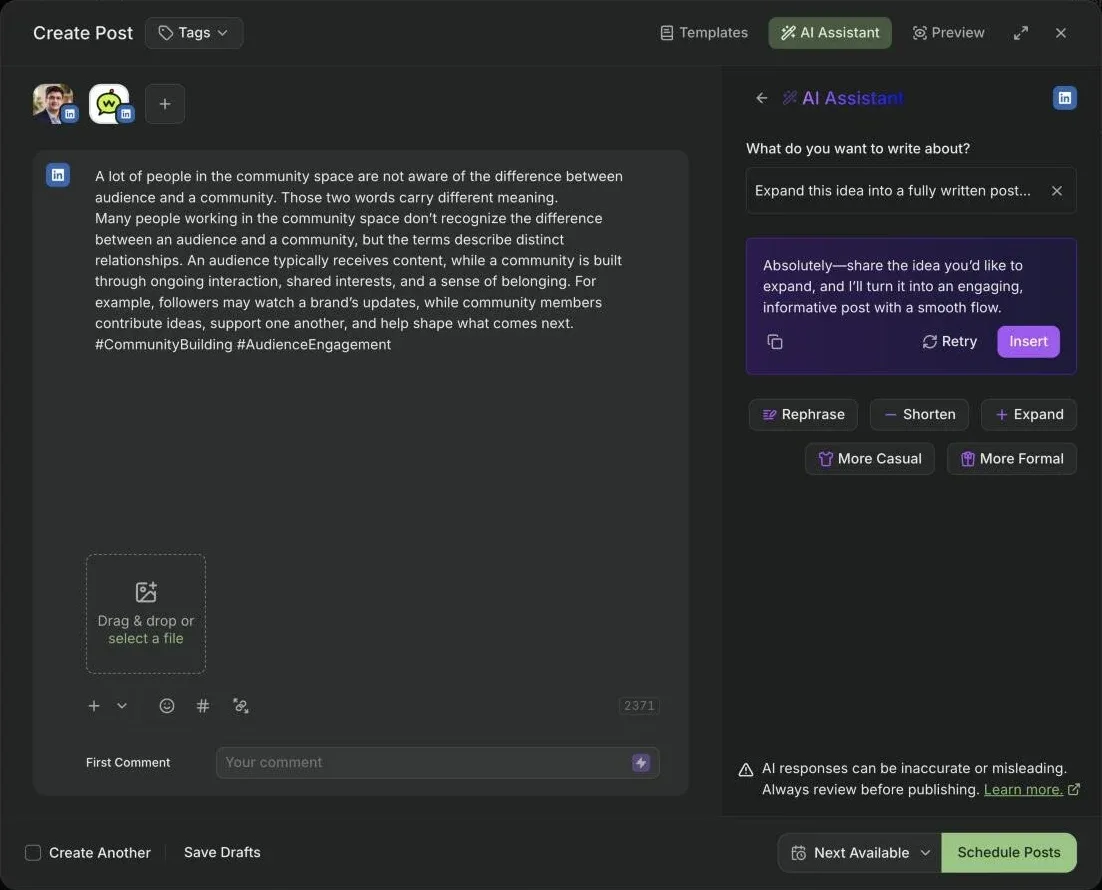
I pressed Insert to see what would happen. It pasted that question into my post too.
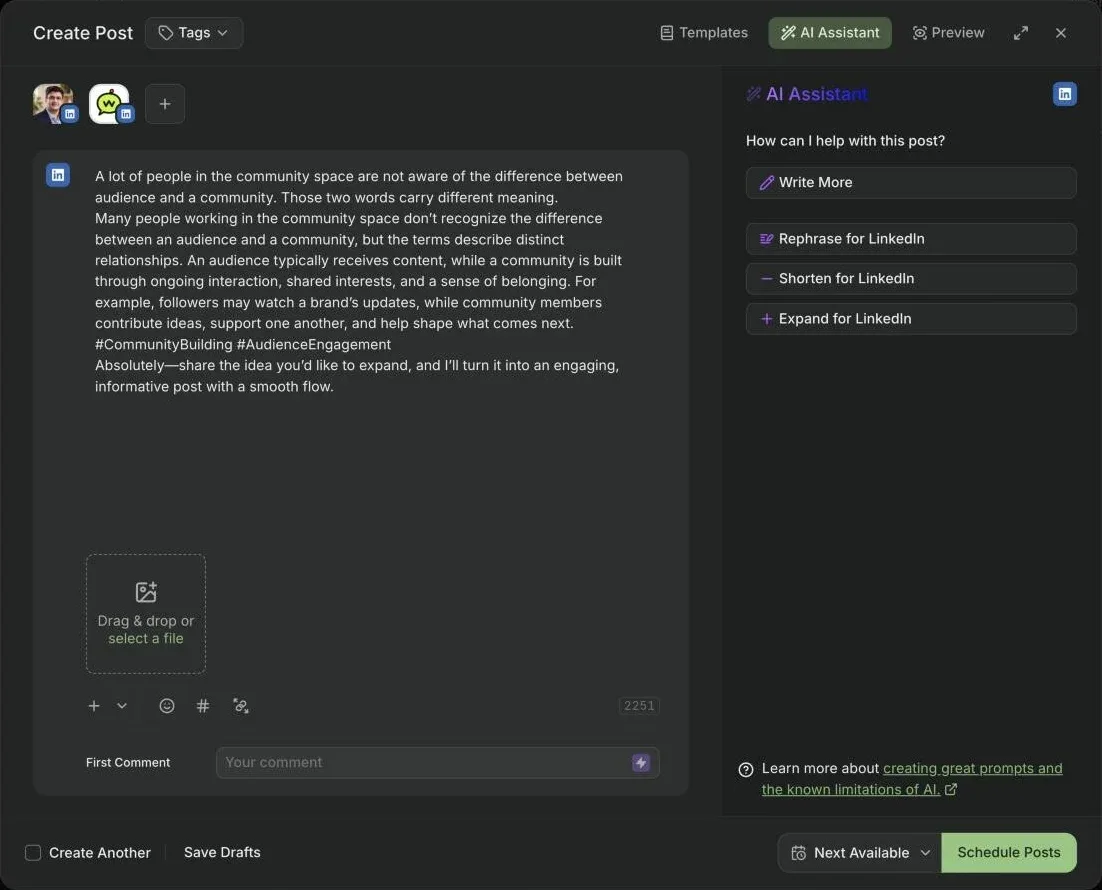
I tried it again later, with the same two lines in a fresh post, just to be sure. Same answer. The "Expand for LinkedIn" button did better that time: four correct, general sentences and two hashtags. But nothing in it sounded like me.
Read end to end, the post wasn't ready to go to any network. I wouldn't post it on my profile. A few minutes in, I still hadn't published anything.
It still wants me to do all the thinking and hard work.
If you want to see what one line can turn into, our free LinkedIn post generator writes a full post from it. And I've put Buffer and Wiral side by side, with these screenshots, on the Buffer vs Wiral.Social page.
What Buffer does well
This isn't all bad. Some of it is very well made.
The look and feel is nice and streamlined.
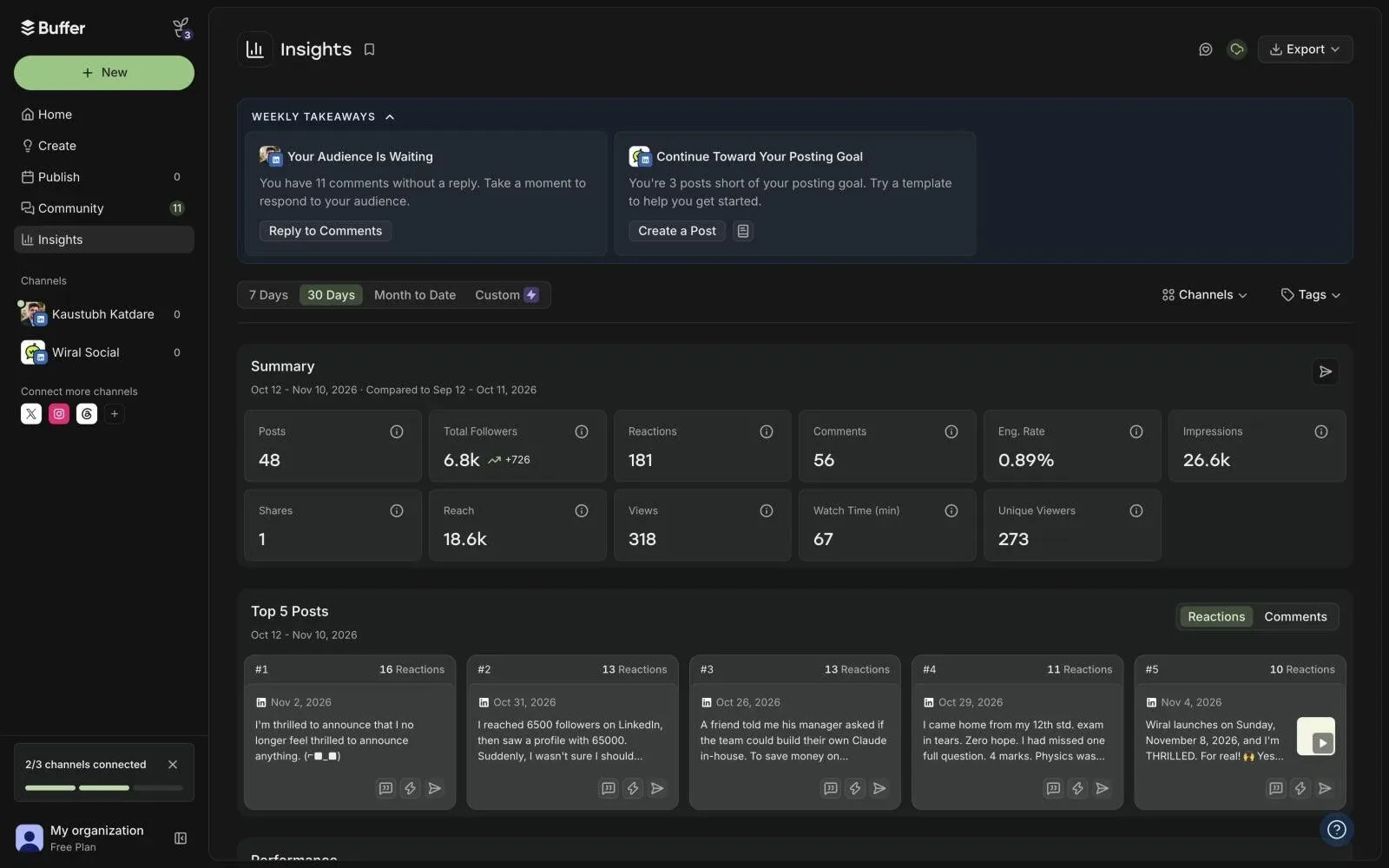
Insights is the best part. The moment I connected LinkedIn, it showed my last 30 days: posts, followers and growth, reactions, comments, impressions, reach, and my top 5 posts. On the free plan. This is genuinely useful, and it's the one thing I'd miss.
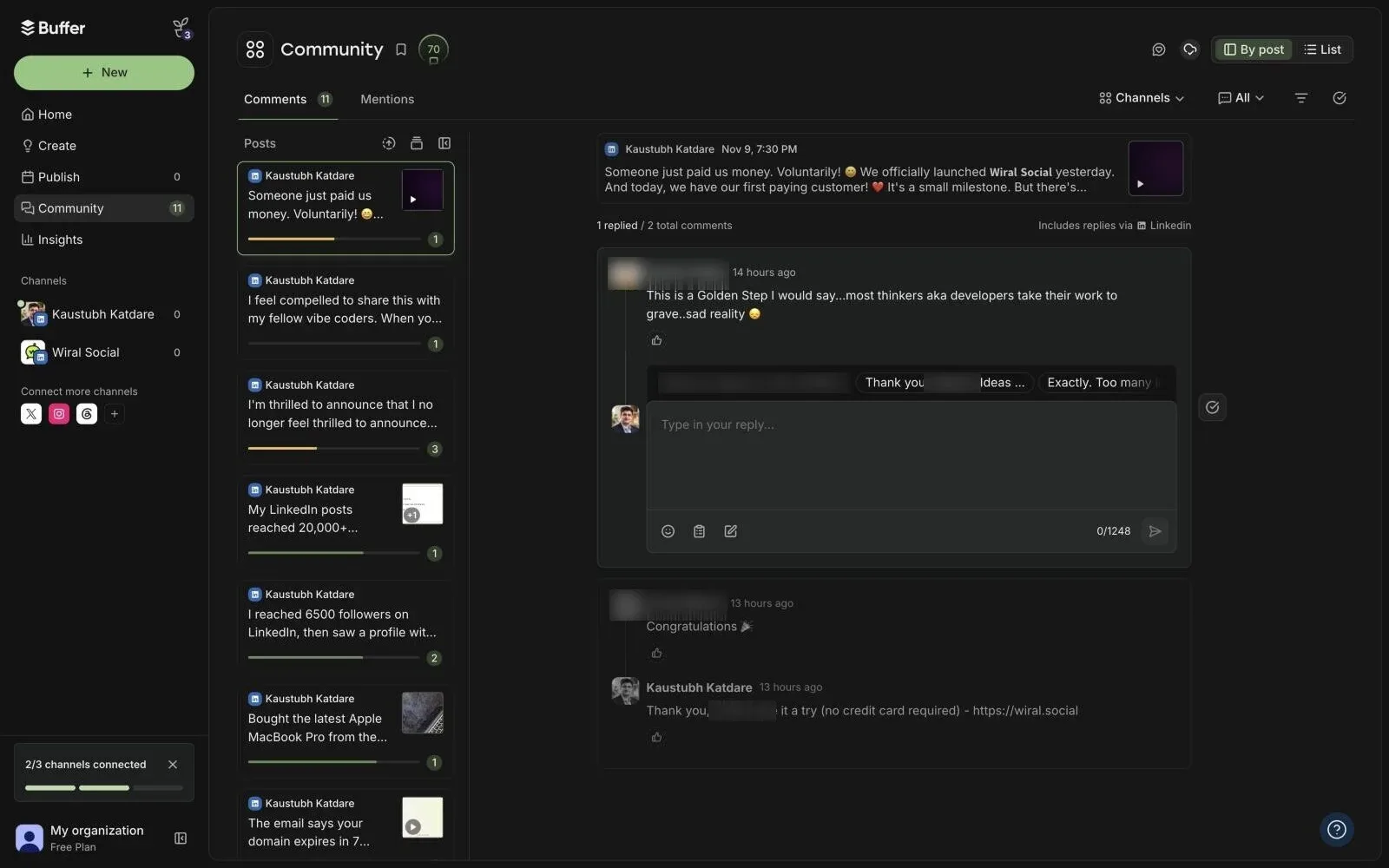
The Community page lists my LinkedIn posts with the comments waiting for a reply, and I can answer right from Buffer, with suggested replies to start from. A very useful feature. I'd just love to see the whole post in view before I reply.
What it costs
The free plan covers 3 channels, with 10 scheduled posts per channel at a time. Essentials is $6 a channel a month, or $5 if you pay yearly. A LinkedIn profile and a LinkedIn page count as two channels, so for my two it came to $120 a year plus tax. For scheduling, that's fair.
Plan | Per channel, monthly | Per channel, yearly | Profile + page, a year | What you get |
|---|---|---|---|---|
Free | $0 | $0 | $0 | Up to 3 channels, 10 scheduled posts per channel, 30 days of stats, AI Assistant |
Essentials | $6 a month | $5 a month | $120 | Unlimited scheduled posts, first comment, full stats and reports |
Team | $12 a month | $10 a month | $240 | Everything in Essentials, plus unlimited users and approvals |
For scheduling, that's fair. The question is what you pay for help with the writing. Here's how the LinkedIn tools I've used compare:
Tool | Starts at | How the AI helps you write | Free trial | Card to try? |
|---|---|---|---|---|
Buffer | Free, then $6 a channel a month | Reworks text you wrote | Free plan; 14 days on paid plans | Not for the free plan |
Wiral.Social (mine) | $9 a month | Writes the whole post from one line, in your voice | 14 days | No |
AuthoredUp | $19.95 a month | No AI writing yet (closed beta) | 14 days | No |
Postwise | $37 a month | AI drafts, 500 posts a month | 7 days | Says no, but you're subscribed when it ends |
Supergrow | $39 a month | Posts from an AI interview (PostCast) | 7 days | Yes |
Taplio | $39 a month; AI from $69 | AI posts on Growth and up | 7 days | Yes |
Prices in US dollars, monthly billing, checked between 4 and 10 November 2026.
Who is Buffer for?
If a friend asked me "Buffer or Wiral?", here's what I'd say.
Buffer is for people who prefer doing it all themselves. Natural writers with lots of ideas, or people who write their posts in ChatGPT or Claude and simply want a nice place to schedule them. Its interface is good, and the stats are worth having.
If you want to publish on LinkedIn with minimal effort, that's why I built Wiral. Wiri writes the whole post from your idea, in your voice, and checks it before you post. I tried another tool with a similar gap last week, and wrote about it in my Supergrow review.
If you're looking around, I've put the LinkedIn tools I've used on one page: Buffer alternatives.
Deleting your account
I haven't deleted mine yet. When you're done: click your avatar at the bottom left, open Settings, and scroll to the bottom of the Profile page. There's a Delete Account button, and Buffer says it permanently deletes your personal data.
Also remove Buffer from LinkedIn: Settings, Data privacy, Permitted services. Deleting the Buffer account may not remove that access.
Do you write your posts first and schedule them later, or do you write and post on the spot? I'd love to know what works for you.