

MagicPost Review: Great Templates, but You Bring the Idea

TL;DR:
Is MagicPost good for LinkedIn? If you sell services and want leads from the people who engage with your posts, yes, it has a lot going for you. The image templates are really good and the stats go deeper than most tools I've tried.
See, the problem real problem most people face is not ‘how to write’ but ‘what to write’. That is, you’ll need a steady flow of ideas to be able to post consistently on LinkedIn. MagicPost starts by asking you for an idea. AI is supposed to reduce your mental load (the one you get by staring at the LinkedIn.
Make no mistake. The app is really well designed and I liked it. But at the same time, I found it super confusing. Even the simplest of the tasks need multiple clicks - and it’s exhausting.
These are the problems you’ll face with most of the tools; but realise them only after you’ve used the tool for a few times.
Now the long version.
Signing up
I signed up with Google. No card needed. I like it!
Right after I signed up, a welcome window said it would ask me a few questions to set up the AI with my writing style and goals. 45 seconds.
Step one: Individual, Agency or Team.
Step two: connect LinkedIn so it can import my writing style.
Well, I skipped step two. I wanted to see what it does without it. After that, the only writing setting left was the language. That's it.
Then it told me the trial is three days.

The window confirms I get all features. Well, not quite. Hooks and AI visuals asked me to upgrade to a paid plan. The trial also came with 3 AI posts, one visual or carousel and 10 lead credits. That's a tight budget for three days.
Well, I’d not complain. AI cost real money and the API costs can pile up quickly. I’ve burnt my fingers offering free API access - but that’s a story for another day.
C’mon, Where's the idea?
The home screen is a chat box. "What are we writing today?"
I sat there for a bit, looking at the screen. I mean for most of us, that's the hard part, isn't it? It’s not that I have a constant stream of amazing post ideas popping-up in my head. I want AI to give me ideas so that I can shape them.
So I went to the Ideas page. It has modes for a topic, a file, a link or a persona. All of them need something from me first. I typed the same topic I gave every other tool: career options for engineering students in an AI-dominated world.
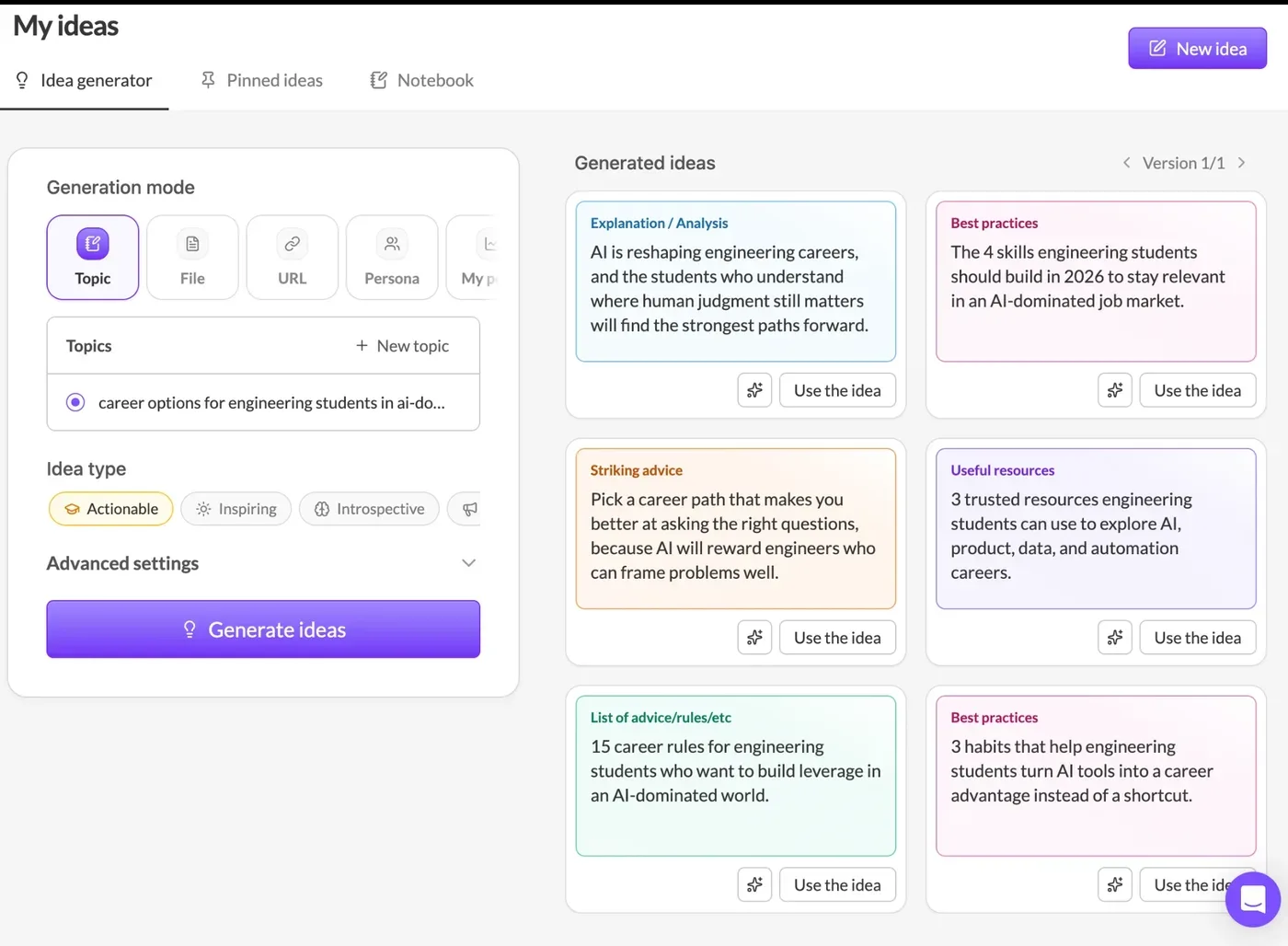
It worked on the first try, which is more than I can say for some tools. But look at them: "4 skills", "3 resources", "15 rules", "3 habits". These posts don’t even get any attention from me (or anyone).
Then I gave it a page from my own community site. This time, the ideas got much better and much more specific. So it does well when you give it good material. You've to bring it, though. Keep that in mind because it’s something that’ll bite you after your 3rd or 4th visit.
"Use the idea"
I picked one and pressed "Use the idea". I expected a post. Obvious, right?
Nope. It took me back to the home chat with the idea pasted in.

Then I opened the style menu.
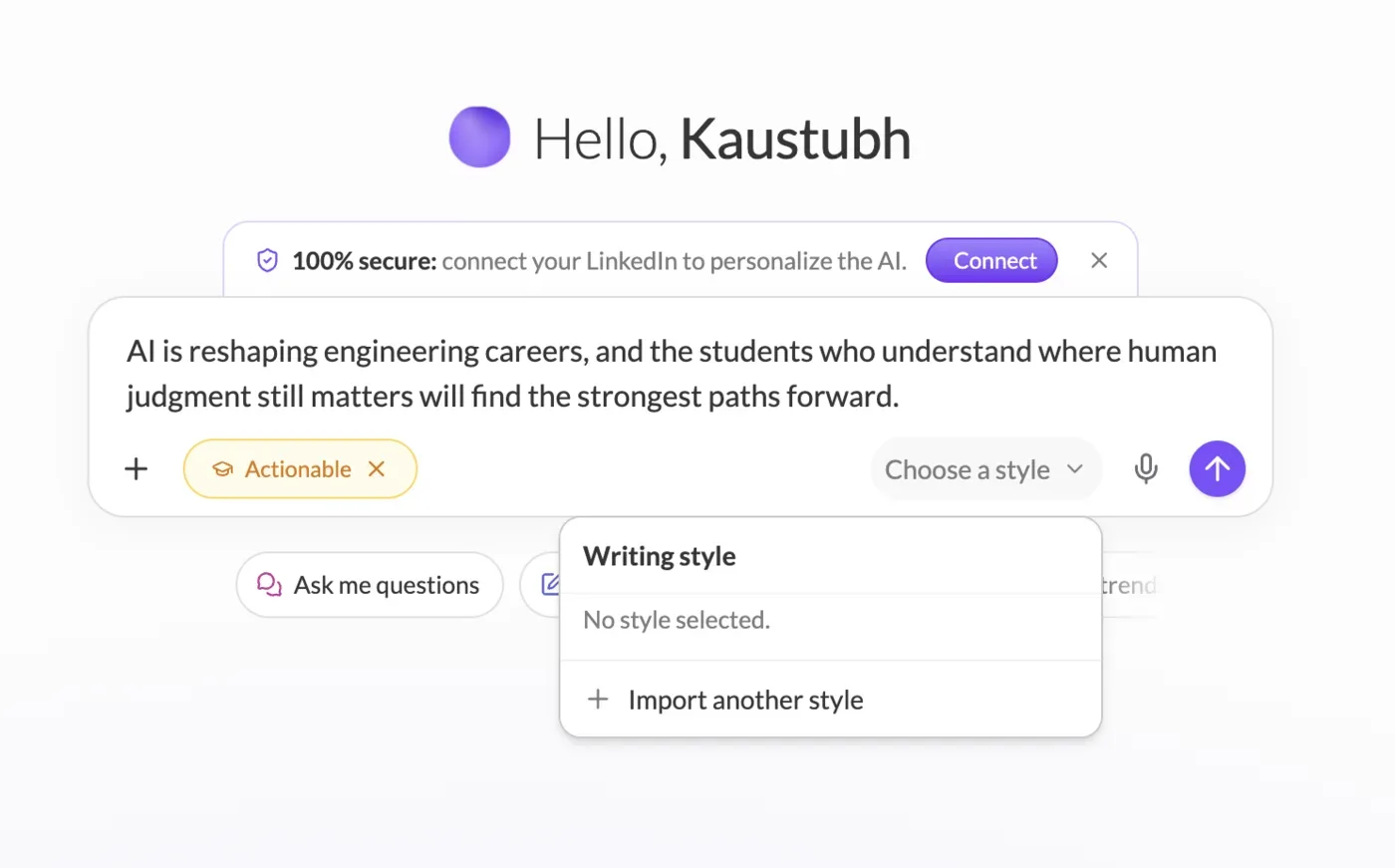
"No style selected." Well, fair enough, I skipped LinkedIn connection. But nothing really asked me how I write or what I post about.
Frankly speaking, it should ask for my style and my topics before it writes a single word. Am I expecting too much from the tool at this point?
The post
I pressed send.
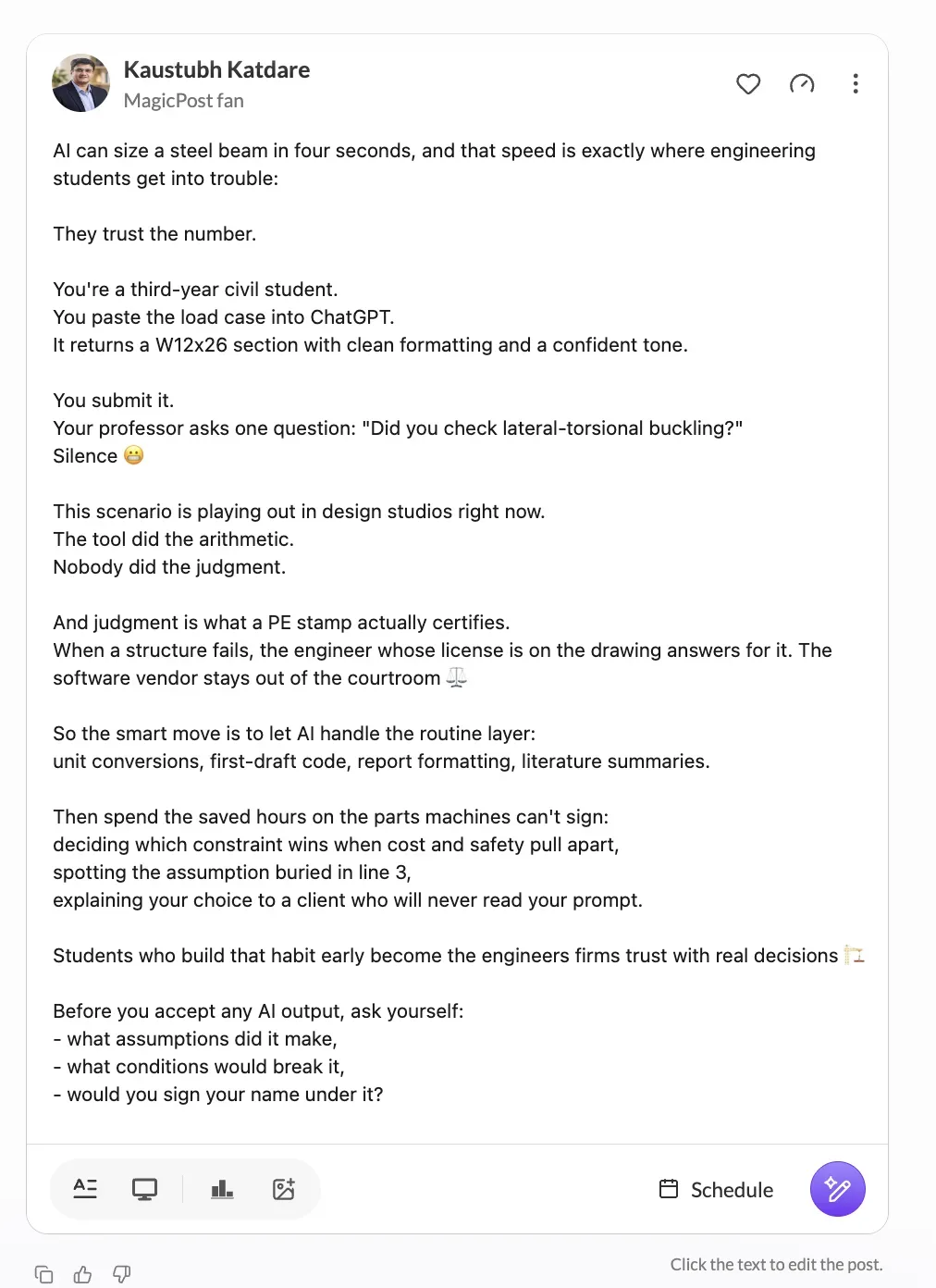
It opened with a steel beam and a third-year civil student who pastes a load case into ChatGPT. Then short one-line beats. "Silence 😬". A checklist of three questions at the end. It even put "MagicPost fan" (bummer: I’m not) as my headline in the preview.
I'd never post it.
I didn't like the writing or the formatting, and it isn't how I write.
The story isn't mine either. I'm not a civil engineer, and "PE stamp" means nothing to most engineering students here in India.
Don't get me wrong, it did one thing I liked. A note above the post said the claim about design studios was worth checking. More tools should do that.
What MagicPost does well. I mean, really well!
The image templates. They're really (really!) good.
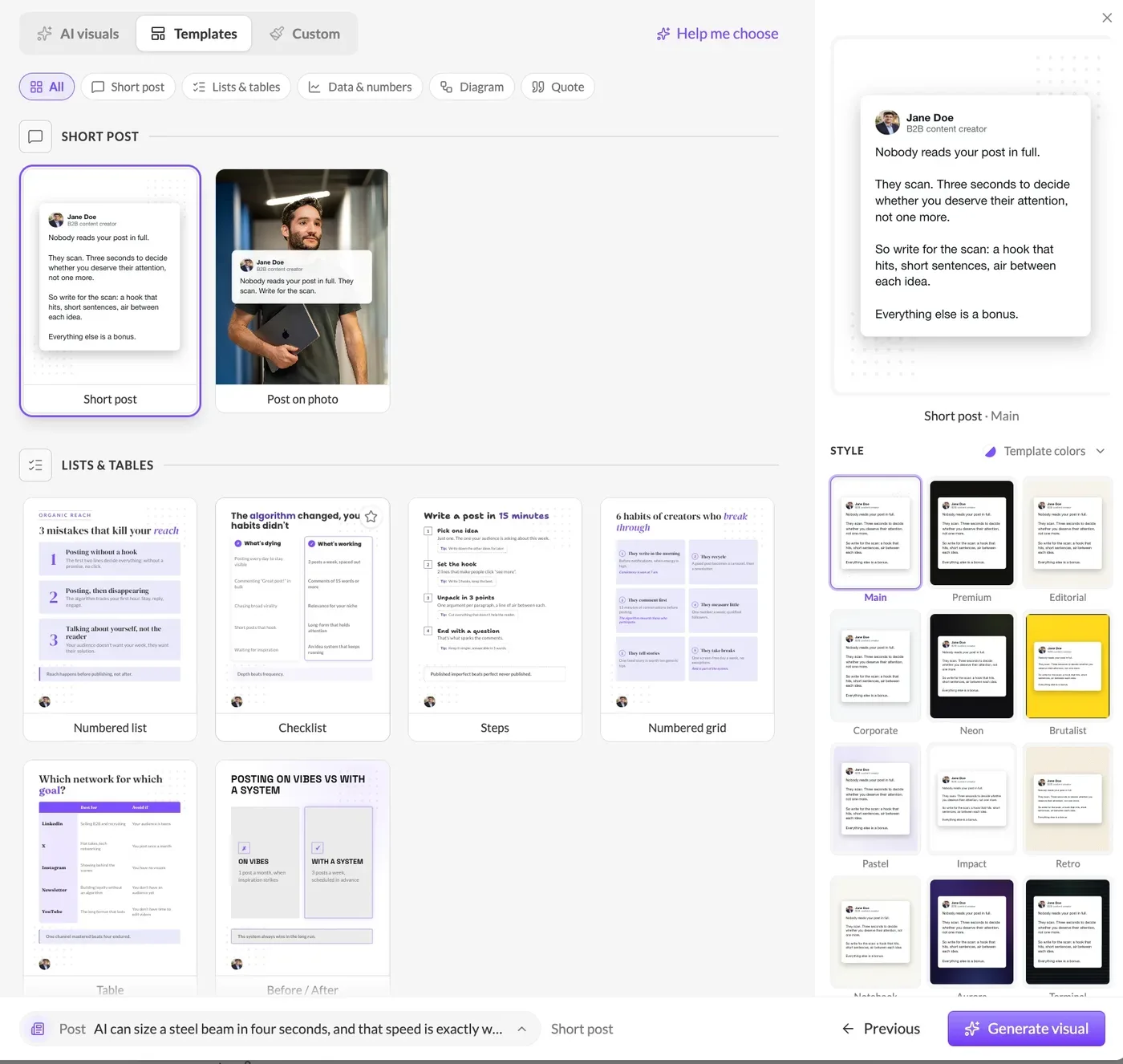
You pick a template and it turns your post into a clean image. You can get - a numbered list, a checklist, steps, a table, a big number, a pyramid, a funnel. Each one comes in twelve colour styles.
Doesn’t require any design skill at all.
The AI ones on the other hand, like a page of handwritten notes or a whiteboard, need a paid plan.
Even the samples are lovely. The makers must have put a lot of thought. I like that!
The carousel editor is impressive as well. It made eight slides from my post in a few seconds. One idea per slide, with the key word in bold.

The catch though: settings live in three places. The brand kit, the whole carousel and each slide. When I turned something off, I couldn't tell which one won.
One slide still said "ADD A HEADER". And I couldn't attach the carousel to my post because their Black Friday banner was on top of the button. See, these are some practical problems, although temporary in nature.
Now, the stats. After I connected LinkedIn, it took about 15 to 20 minutes to pull my posts. Every post gets a score against my own median, and posts are sorted into Viral, Bangers, Good and Flops. I love those names.
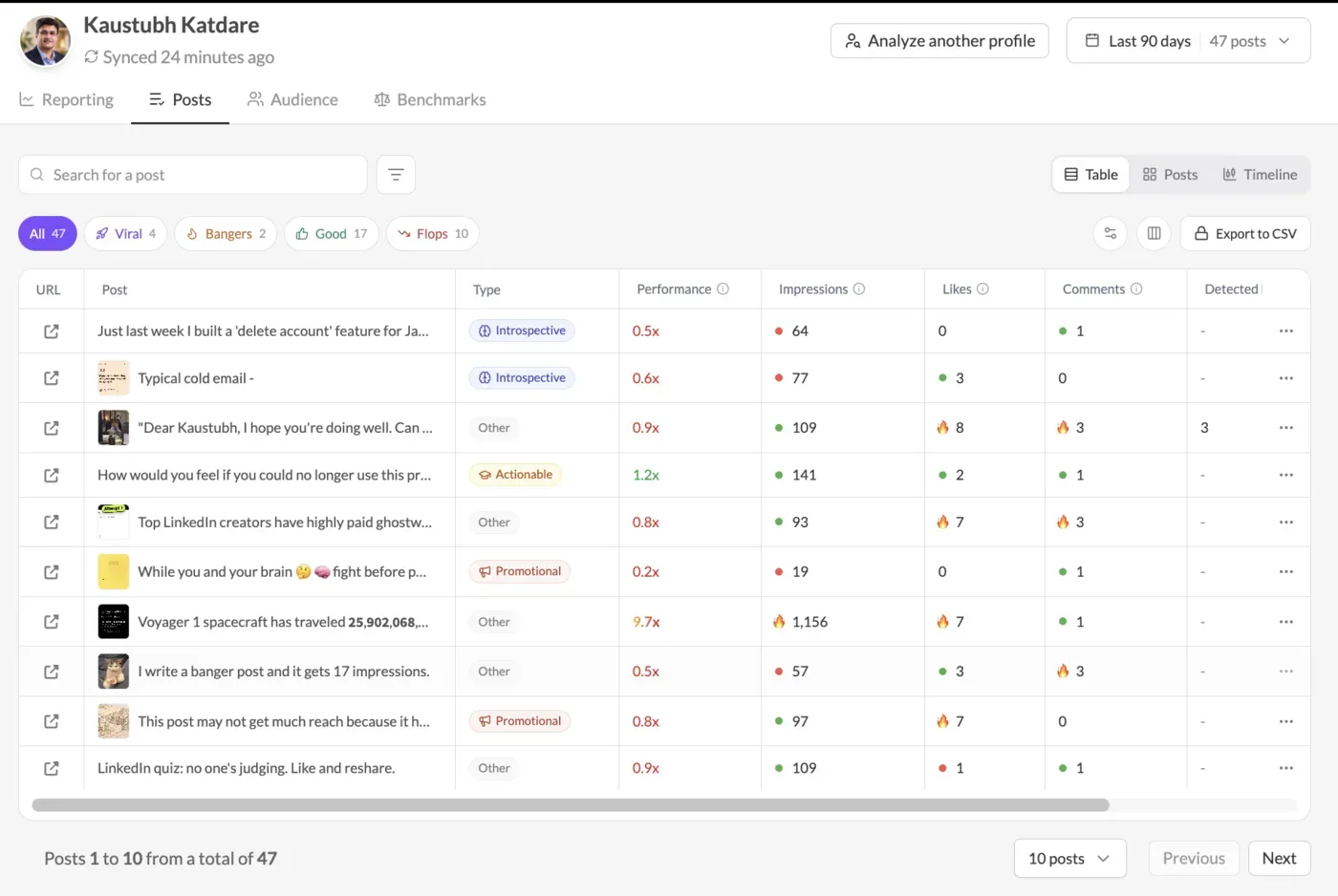
There's also a benchmark against accounts my size, the best post length and the best days to post.
TBH, I found the benchmark unfair. LinkedIn's algorithm keeps changing, so a number like "113 impressions" doesn't tell me much.
See, comparing me with my own past makes more sense than comparing me with strangers. If you only want a starting point for days and times, our free best time to post tool gives you one for your time zone. And for how often to post, here is what my 4-month experiment taught me. Give it a read.
Leads is the one of the bigger features of MagicPost. It looks at the people who liked or commented on a post and scores them against the customer you describe. On one of my posts, it scored 11 people in seconds and kept 3. Very handy, if you ask me. But I’d not use it because my goal is to build personal brand on LinkedIn.
There are better tools to pick leads from LinkedIn.
Too many clicks
This is what wore and bore me down.
I wanted to see three comments on one of my posts. I picked the post, pressed Sync, confirmed in a pop-up, then pressed Open button.
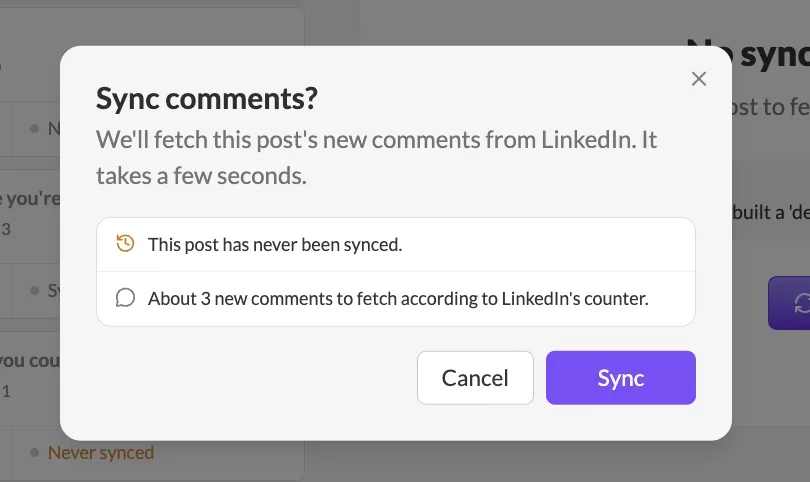
It took me to LinkedIn. Where I could have started in the first place. It’s bit confusing.
That's how I felt all day. There's a lot to explore in MagicPost, but every feature comes with extra clicks. By the time I reached the Engagement section, I was bored; and I’m not even kidding.
What it costs
Growth is $49 a month, or $29 a month billed yearly. It has no AI writing. The plan that writes posts is Creator: $69 a month, or $39 a month billed yearly. Team and Agency are $59 per seat, from two seats.
Plan | Monthly | Billed yearly | AI writing |
|---|---|---|---|
Growth | $49 | $29 a month | No |
Creator | $69 | $39 a month | Yes |
Creator, Black Friday (until 6 Dec) | $48 | $27 a month | Yes |
Team and Agency | $59 per seat, from two seats |
Their Black Friday deal runs until 6 December 2026: Creator at $48 a month, or $27 a month billed yearly, and you keep that price for as long as you stay. From India, the prices show in rupees.
Refunds are case by case, and the terms say purchases aren't refundable.
Deleting your account
Simple: Settings, then a code sent to my email. No "please stay" offer.
One more thing - deleting the account doesn't remove its access to LinkedIn. Go to LinkedIn › Settings › Data privacy › Permitted services and remove MagicPost there. Forgotten tools like this can get your account restricted. I asked other creators what they do about it.
Who should use MagicPost?
MagicPost is a well-made tool and I think it’s made for those looking for leads from LinkedIn. The biggest problem I face everyday is coming up with ideas for posts. MagicPost didn’t help me with that.
As I said earlier, the image templates are really good. If you make use of lot of images in your posts, MagicPost is worth trying.
The part that’d hold me back is the $49/mo price tag. I mean, it seems overpriced for the value it creates. But remember, this comes from someone who built a competitor to MagicPost.
When I began building Wiral, I wanted to create a tool that does the heavy lifting and only asks the user to edit and approve.
I've put the two side by side, with these screenshots, on MagicPost vs Wiral.Social. Every tool I've used is on MagicPost alternatives.
If you have questions, post them below. I’ll respond asap.